


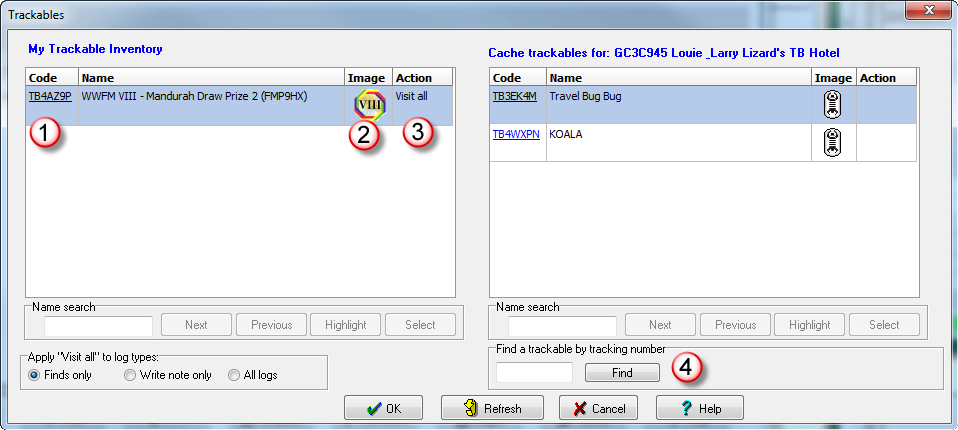
The left hand grid shows all the trackables that the api reports as being in your inventory (note this list excludes trackables that are in your "collection")
The right hand grid shows all trackables that are in the current cache you are logging
 This is the Trackable code. It is a "hot link" and if you click on the link, the trackable page will open in your default browser
 This is the image associated with the trackable
 This is the action you want to perform on the trackable when you "Publish logs". Actions are performed via the right click menu. So just select a trackable in the grid, right mouse click, and select the required action. For inventory the actions are:
Edit - This allows you to edit the current pending action
Drop - Drop this trackable into the current cache
Visit - "Visit" this trackable into the current cache
Remove - This will remove the current pending action
Visit all - Make this trackable visit all caches you publish logs for, depending on the log type which is selectable. Unlike the drop and visit actions, this one is "sticky" which means once set this trackable will visit the caches every run you do
Stop visit all - Use this action on the log where you would like the "Visit all" to stop. . When GSAK sees a "Stop visit all" action it will then ignore any future visits by that trackable (which would normally be logged as a result of the "Visit all" action).
Ignore visit all - Use this action to ignore the "Visit all" for this log only.
Delete - Delete/Remove the trackable from your inventory. Note: This option is only visible for "temporary" trackables. That is, trackables you have a pending "retrieve" action but haven't yet actually retrieved the trackable into your inventory. For more information see this link.
"Visit all to log types". Select which log types the trackable should visit. Finds only - Only log types that are considered a "find" will the trackable publish a visit. Write note - Only publish a visit for "Write note" logs. All logs - the trackable will publish a visit for all logs regardless of log type.
For cache trackables the actions are:
Edit - This allows you to edit the current pending action
Discover - Discover this trackable
Retrieve - Retrieve this trackable and place in your inventory. Note: The trackable is immediately placed in your inventory when you use this action. However, you can only view it and perform other actions on the trackable on logs after this log. This protects you from performing an action on the trackable before you have actually retrieved it.
Remove - This will remove the current pending action. If the pending action is "retrieve" then the trackable will also be removed from your inventory.
Write note - Publish a note for this trackable.
 Enter the tracking number here to find the public tracking code and trackable description.
Note: "My Trackable Inventory" items are fetched via the api once per session (A "session" lasts from the time you take the "Publish logs" option to the time you exit that dialog) and then cached. This makes for quicker response when performing trackable actions. For "Cache inventory" the api call is used for each cache you move to and then click on the trackable button. If you later edit that same cache in the session then the trackable dialog should not use any api calls and display instantly. If you have a situation where status of a trackable changes at Groundspeak while you are in the current session, then click on the "refresh" button to force the trackable information to be refreshed using the api.
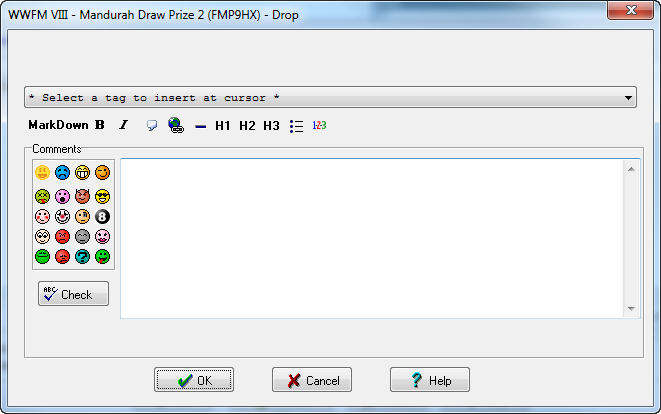
MarkDown - Groundspeak do not support HTML in logs, but they do support MarkDown which enables you to enhance the look of your trackable log. Use this bar to quickly insert the required MarkDown code. For more information on entering MarkDown see this link. If you select some text then that text will be wrapped in the corresponding MarkDown symbols, otherwise these symbols will just be inserted at the cursor and it is up to you to insert the text.The one exception is the "link" button - you will be prompted with a dialog.
You can include dynamic information via the use of tags:
%OwnerName - The owner name of the trackable
%Caches_xxxx - This tags gives you access to any of the database fields (where xxxx = the required field name) in the main GSAK CachesAll table (which includes the custom table). However, this tag will only be resolved if there is a corresponding entry for the logged cache in the database (it is not mandatory for the cache to exist in the database when logging)
%date - see templates
%time - see templates